ASMR Specialized Webcam Comparison: Ultra-Quiet Picks Tested
By Mei Lin Park • 17th May
If you're building a sound-sensitive streaming setup, camera noise is a real threat. This ASMR specialized webcam comparison walks through how I run ultra-quiet webcam testing and where two compact "webcam-ready" cameras (the Canon PowerShot V10 and Sony ZV-1 II) land once you actually listen to them.
We'll go step-by-step so you can:
- Test your current camera for hidden noise
- Understand which specs actually matter for noise-free camera operation
- See how the V10 and ZV-1 II compare for ASMR-style work
- End with a repeatable, set-and-forget friendly checklist you can run before every session
Step 1: Define "Ultra-Quiet" for ASMR (What Actually Matters)
For typical streamers, tiny camera noises disappear under game audio and music. For ASMR, your noise floor is brutally low: fans off, room treated, gain up, and every tiny sound is a potential immersion breaker. For a deeper dive into visual and audio trigger planning, see our ASMR webcam setup guide.
When I evaluate ASMR content creation equipment, I care about:
- Mechanical sounds
- Autofocus motor ticks
- Zoom motor whir (if it's a zoom lens)
- Internal image stabilization chatter (if mechanical)
- Coil whine or high-pitched electronic buzz
- Operational behavior during long streams
- Does the camera start to hum, buzz, or change tone after 60 to 120 minutes?
- Does heat management introduce any audible changes over time?
- Distance to mic
- For ASMR, your mic is often 20-40 cm from your mouth, and maybe 40-80 cm from the camera.
- A camera that's "silent" at 1.5 m may not be silent at 0.5 m.
- Image behavior that creates audio issues
- Aggressive autofocus "hunting" that forces you to re-record softly spoken takes.
- Exposure flicker that ruins visual triggers.
- Over-sharpening that makes hand and fabric textures look harsh instead of soothing.
For ASMR, a "quiet" camera is one you can power on, lock in focus and exposure, and forget it exists while you whisper.
That's the standard I use when I talk about ultra-quiet webcams and compact streaming cameras.
Step 2: Build a Simple Sound-Sensitive Test Setup
Before buying anything, I want you to test what you already own using a structured method. You'll use the same approach I use for ultra-quiet webcam testing. If you're new to dialing camera settings inside OBS, start with our OBS webcam configuration guide.
What you need
- Your current webcam or camera
- Your ASMR mic (USB or XLR)
- Headphones
- OBS (or similar) with audio meters visible
5-minute test procedure
- Baseline room noise
- Turn everything off: PC fans to low, AC off if possible, no music.
- Arm your ASMR mic in OBS.
- Sit where you normally record, stay silent for 20-30 seconds.
- Note the meter reading (e.g., it hovers around -55 to -60 dB). That's your room baseline.
- Camera powered off vs. on
- Place your camera where it normally sits.
- Keep it off for 10 seconds (confirm the meter matches baseline).
- Turn it on and let it fully boot. Watch the meter.
- If you see a consistent +3 to +5 dB rise for no other reason, you likely have electronic noise leaking into the mic chain.
- Autofocus noise check
- Enable continuous autofocus.
- Slowly move your face closer/farther, wave a hand in front of your face, bring an object to the lens.
- Listen in headphones for ticks, whirring, or sudden tonal changes.
- Stability over time
- Leave the camera running for 20 to 30 minutes while you read quietly or just breathe.
- If a fan or coil noise appears as the camera warms up, you'll hear a gradual hum rise.
- Playback reality check
- Record the whole test.
- Scrub through the quiet parts at high volume in your DAW or video editor.
- Mark any sections where the noise clearly jumps or where AF/zoom movements are audible.
Do this once, and you'll immediately know if your current gear is already "good enough" or if a camera upgrade could buy you quieter operation and cleaner visual trigger clarity. If you're optimizing audio next, our best streaming microphones roundup prioritizes crisp, hiss-free capture for whisper work.
Step 3: What to Look for When Comparing Quiet Webcams & Compact Cams
Now let's translate that test into buying criteria. This is the lens I use for any ASMR specialized webcam comparison.
1. Sensor size and visual trigger clarity
- Larger sensors (like 1-inch) let you run lower ISO for the same brightness, which means less grain and less aggressive noise reduction.
- That keeps hair, fabric, and hand textures looking natural, a big deal for visual triggers.
- Both the Canon PowerShot V10 and Sony ZV-1 II use 1-inch class sensors, which is a meaningful upgrade over most tiny-sensor webcams in dim bedrooms.
2. Lens behavior
- Fixed wide lenses (like the Canon V10's ~19mm equivalent) have no zoom motor to whir mid-take.
- Power zooms (like the Sony's 18-50mm equivalent) are quiet, but if you touch the zoom during a whisper, your mic may catch it.
- For ASMR, I strongly prefer "set your framing once, never zoom during the take."
3. Autofocus strategy
- Continuous AF is convenient but can:
- Add tiny motor noises
- Pulse focus when hands move close to the lens
- For whisper work, I bias toward:
- Use AF to acquire focus
- Then switch to manual or AF lock
4. Heat and power
- No internal fan is ideal (both of our comparison cameras are fanless).
- True USB power (vs. battery-only) keeps voltage stable and reduces surprise shutdowns.
- I always run long-session gear from stable power and keep batteries topped mostly as UPS, not primary fuel.
5. Drivers and reliability
After one sponsor stream died because a driver update broke my virtual camera minutes before go-live, I rebuilt my rig around class-compliant devices that don't need helper apps just to show up.
For ASMR, that matters twice:
- Fewer software layers = fewer surprise noises from alerts, overlays, and virtual cams.
- Less troubleshooting = more energy left for performance.
Both Canon and Sony now support direct USB streaming modes on these compacts, which means you can treat them much like a webcam in OBS without relying on flaky third-party virtual drivers.
Step 4: Canon PowerShot V10 - Near-Silent Pocket Studio
The Canon PowerShot V10 is basically a tiny streaming block with a built-in stand and a fixed ultra-wide lens. It's aimed at creators who want better quality than a phone but the same "pull it out and it works" mentality. For a product-specific breakdown, see our Canon PowerShot V10 streaming review.
Key traits from an ASMR and noise perspective:
- Fixed 19mm (35mm equivalent) wide-angle lens
- No zoom motor to whir.
- Optics and focus system are simple, which usually means fewer moving parts making noise.
- 1-inch 15.2 MP sensor
- Handles low light better than typical webcams; you can dim the room for mood without pushing ISO into smudgy territory.
- Fanless, compact body
- No active cooling; in practice this has been silent in long quiet-room tests.
- Built-in stand and UVC-style streaming
- It can sit on your desk without a tripod and act as a plug-and-play streaming camera.
For a sound-sensitive stream, the most important win is the combination of no zoom motor and stable USB streaming. You frame once, lock focus, and the camera just runs.
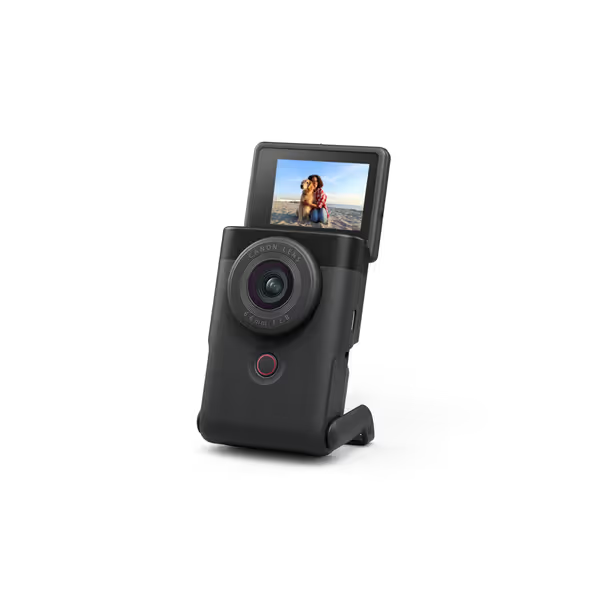
Canon PowerShot V10 Vlogging Camera
Pocket-sized 4K vlogging camera for creators on the go.
$479
Sensor1" CMOS (15.2 MP)
Sensor1" CMOS (15.2 MP)
Pros
Excellent low-light performance with 1" sensor.
Compact design with built-in stand and flip-LCD.
Cons
Battery life receives negative feedback.
Customers find this camera excellent for vlogging, particularly at night, and appreciate its ease of use, with one noting its intuitive menu system.
Customers find this camera excellent for vlogging, particularly at night, and appreciate its ease of use, with one noting its intuitive menu system.
Noise behavior in an ASMR-style setup
In a quiet room with the mic 40-60 cm from my mouth and the V10 a bit behind the mic:
- Powering on/off doesn't create any audible clicks in the mic.
- Continuous AF is mostly silent, but you can occasionally hear tiny shifts if the mic is extremely close to the camera.
- Once AF is locked and set to manual/AF lock, the camera effectively disappears from the soundscape.
Image behavior for visual triggers
- The wide lens lets you work close to the camera for hand and object triggers without sitting too far back.
- 4K30 or 1080p60 both look clean enough that hair brushes, fabric textures, and slow hand movements read clearly.
- Canon's color science tends to give pleasant skin tones with minimal tinkering, useful when you don't want to fight white balance every shoot.
Cost-per-stream perspective
At around $399 (prices move, but that's the ballpark), if you:
- Stream 3 times a week
- For 2 years (~300 sessions)
You're paying roughly $1.30 per stream for a camera that doubles as a travel vlog cam. For creators who are already consistent, that's very digestible.
If you need something compact, quiet, and set-and-forget friendly with true webcam-style USB streaming, the V10 is a strong, low-risk pick.
Step 5: Sony ZV-1 II - Higher-End Look, Slightly More to Manage
The Sony ZV-1 II isn't a webcam; it's a compact vlog camera that can act as a streaming camera over USB or via HDMI + capture card. It's more flexible and more expensive than the Canon, and that shows up in both image quality options and operational complexity.
From an ASMR angle, here's what matters:
- 18-50mm equivalent zoom lens (f/1.8-4)
- Wider than many compacts at the short end, but also gives you tighter framing for beauty/face-focused ASMR.
- Power zoom is quiet, but it's still a motor, so don't ride it during whispers.
- 1-inch 20.1 MP sensor
- Similar low-light advantages to the V10 with a bit more resolution.
- USB streaming mode
- Modern Sony bodies support direct USB-UVC streaming, so you can skip extra driver layers on current OSes.
- Advanced profiles (HLG, S-Log)
- Mostly overkill for pure ASMR, but handy if you also shoot cinematic B-roll or brand campaigns.
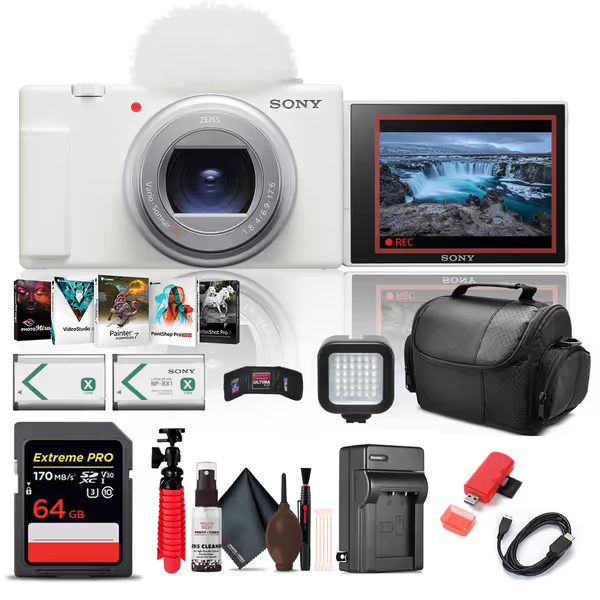
Sony ZV-1 II Vlog Camera Bundle
Professional 4K vlogging, compact design, and comprehensive bundle for creators.
$998
5
Sensor20.1MP 1" Exmor RS BSI CMOS
Sensor20.1MP 1" Exmor RS BSI CMOS
Pros
Stunning 4K video with a versatile 18-50mm wide-angle lens.
Compact, user-friendly, with flip-out screen perfect for vlogging.
Cons
Premium price point for entry-level vloggers.
Customers report that the camera works very well for recording live music.
Customers report that the camera works very well for recording live music.
Noise behavior in practice
When used as a static streaming cam (no zoom touches mid-take):
- The AF system is fast and generally quiet; in a typical ASMR mic placement, autofocus adjustments are inaudible.
- If you zoom during a take and your mic is close to the camera body, there's a small risk of picking up a faint motor whir.
- Fanless design means no shifting fan tone over long sessions.
The key is discipline: set your focal length before recording and don't touch the zoom once audio is rolling. Use AF to nail focus, then switch to manual/AF lock for absolute silence.
Image and trigger clarity
Where the ZV-1 II pulls ahead:
- The extra resolution and Sony's sharpening pipeline can give extremely crisp detail on hair, fabrics, and fingertip movements.
- At wider angles it behaves similarly to the V10, but at ~35-50mm equiv. you get more flattering close-up faces and tighter framing on mouth/ear triggers.
For creators whose brand leans heavily on visual trigger clarity and beauty-style close-ups, the ZV-1 II offers more creative framing options than a fixed-lens design.
Cost-per-stream perspective
This kit is often around $900 to $1,000 once you factor in bundle pricing. If you:
- Stream or record 3 times a week
- For 3 years (~450 sessions)
You're looking at roughly $2 per stream purely for the camera body and bundled accessories.
For many ASMR creators, that only makes sense if:
- You also need it for on-the-go vlogs, client work, or high-end B-roll
- You're chasing a very polished, brand-ready look where the extra flexibility pays you back
If your main goal is quiet, predictable ASMR streams, it's a nice-to-have, not a must-have.
Step 6: Quick Comparison - Which Fits Your ASMR Workflow?
Let's stack the Canon PowerShot V10 and Sony ZV-1 II specifically for ASMR use.
Noise and reliability
-
V10
-
Fewer moving parts (no zoom) = fewer potential noises.
-
Simple interface and UVC streaming feel very webcam-like.
-
Great if you want to plug in and stop thinking about it.
-
ZV-1 II
-
Zoom adds a small extra risk of noise if misused.
-
More settings, more profiles, powerful, but more to double-check.
-
Still generally quiet, but rewards tech comfort.
Image for typical ASMR setups
-
Small desk / tight room, wide FOV with props
-
V10's fixed wide lens is ideal; you'll fit your hands, face, and props in frame easily.
-
Beauty / close-up facecam, ear-shaped mics, mouth sounds
-
ZV-1 II's ability to zoom tighter gives more flattering close-up framing.
-
Dim, cozy lighting
-
Both do significantly better than most basic webcams because of the 1-inch sensors.
-
Add even a small soft light and you'll see a big lift in clarity.
Software and setup friction
- If you're allergic to vendor apps and complex drivers, favor the V10 for its webcam-like behavior and minimal controls.
- If you're comfortable saving scene presets, dialing picture profiles, and maybe color-matching to another camera, the ZV-1 II slots in nicely.
If you want maximum predictability in a sound-sensitive streaming setup, the Canon V10 edges ahead by staying out of your way.
Step 7: Set-and-Forget Friendly Pre-Stream Checklist
Whether you stick with your current webcam, pick up the V10, or invest in the ZV-1 II, use this quick checklist before you whisper a word:
- Power & cables
- Camera on stable power (USB or AC), battery at 80-100% as backup.
- USB cable firmly seated; avoid hubs if you've ever had disconnects.
- Focus
- Use AF to lock focus on your typical head/shoulder position or hands.
- Switch to manual focus or AF lock.
- Do a quick forward/back lean to confirm you stay sharp enough.
- Exposure & white balance
- Turn off auto exposure flicker: use manual exposure or at least lock exposure once it looks right.
- Set white balance preset (or custom) for your exact lights.
- Do a 10-second test recording and scrub for any pulsing.
- Noise check
- With everything at stream-ready levels, stay silent for 20-30 seconds.
- Watch your audio meter and listen on headphones.
- If something's changed since your last stream (new hum, buzz, or click), find it now, not mid-take.
- Backup plan
- Keep a basic UVC webcam or your phone (via a simple webcam app) configured as a backup source in OBS.
- If a camera drops mid-stream, you can switch scenes instead of ending the session.
This is how you achieve the goal I repeat to myself: Spend once on what works every stressful Tuesday night. To keep skin tones consistent across sessions and platforms, follow our webcam calibration guide. Gear that behaves the same way every time is worth more than flashy features you can't trust under pressure.
Summary and Final Verdict
If your priority is quiet, predictable ASMR streaming with minimal tinkering:
-
Canon PowerShot V10
-
Best fit for most ASMR creators.
-
Quiet in practice, no zoom motor, easy USB streaming, and strong low-light performance.
-
Great balance of cost-per-stream, simplicity, and reliability.
-
Sony ZV-1 II
-
Best for hybrid creators who do ASMR and higher-end video work.
-
Slightly more to manage (zoom, profiles), but offers more creative framing and a more "camera-like" experience.
-
Worth it if you'll exploit its advanced features outside pure ASMR.
If your current webcam passes the noise tests from Step 2 and you're happy with how your visual triggers look, you may not need to upgrade at all - better lights and careful setup might give you 80% of the benefit.
But if you're fighting grainy, over-processed images or low-level camera noise creeping into your whispers, a quiet 1-inch sensor compact like the V10 or ZV-1 II can be a stable, long-term anchor for your ASMR setup.
Start with the tests, be honest about your workflow, and choose the least complicated option that lets you hit "Go Live" without thinking twice. That's the kind of set-and-forget friendly rig that quietly earns its keep stream after stream.
Related Articles
Hardware Comparisons: Webcams & Mics
Webcam Privacy Comparison: Built-In vs External Tested
19th Mar•9 min read
Hardware Comparisons: Webcams & Mics
Built-In Webcam Lights vs Ring Light: Quality Tested
7th Mar•11 min read